Operator
The screen the line runs on — prepare program runs, watch them execute, and read the pass/fail outcome without interpreting data.
Operator is the screen an inspection cell runs on day to day. One person at the kiosk prepares program runs, watches them execute, and reads the QC outcome — pass or fail, per check, with the measured values next to their tolerances. No metrology background required, nothing to interpret.
One part, start to finish#
Select a program, scan or type the part's serial number, and run. Progress is live as the cell works through the program's steps, and the moment analysis completes the outcome is on screen — the QC outcome banner, and under it every quality check with its value, threshold, and message.
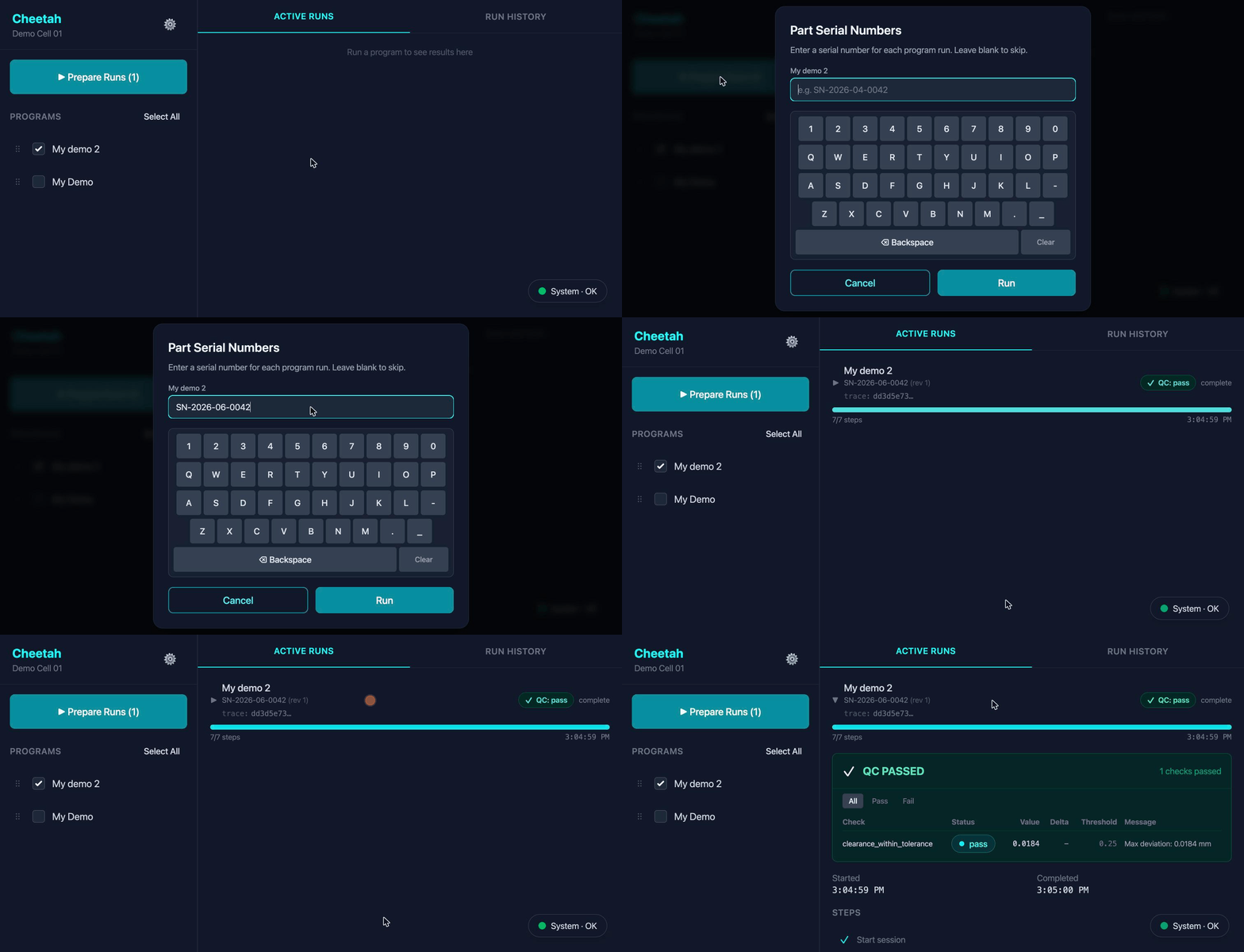
The serial number does more than label the screen: it keys the part's revision counter, so re-inspecting the same part after rework is tracked automatically, and it's the handle your quality systems use to find this inspection later.
Everything the cell has done#
The run history holds every past program run with its outcome — searchable by serial number, so "what happened with part SN-2026-06-0042?" is one query at the kiosk. Each entry opens into the full record: per-step results, the analysis trail, and the quality report.
The same truth your systems see#
What the operator reads on screen is the same data Cheetah pushes to your systems as lifecycle events and serves over the open REST API — one record of the inspection, whether a person or an MES is asking.